In today's dynamic business environment, maintaining employee engagement and effectiveness is critical to an organisation's success. Traditional, passive training methods, such as lengthy presentations or static documents, often fail to deliver the desired results. Employees, accustomed to the interactivity of digital media, expect similar experiences in their professional development. The answer to these needs is H5P – a technology that is revolutionising corporate e-learning.
In this article, we will show you what H5P is and why interactivity is so important in training. We will present 15 ready-made H5P content formats that you can immediately implement in your company to increase engagement, improve knowledge retention, and measure real learning progress. You will also learn how the LMS3 platform allows you to fully leverage the potential of these tools by creating a consistent and effective learning environment.
What is H5P and why is it worth implementing?
H5P (HTML5 Package) is a free, open-source toolkit that allows you to create rich, interactive e-learning content without the need for programming skills. With H5P, learning and development (L&D) professionals can independently design engaging materials such as quizzes, interactive videos, simulations and games, and then embed them directly into a learning management system (LMS)
.
Key benefits of implementing H5P in corporate training:
- Increased engagement: Interactive elements turn passive listeners into active participants, which significantly increases motivation to learn.
- Better knowledge retention: The "action-based learning" method helps employees remember and apply the knowledge they have acquired in practice.
- Immediate feedback: Participants immediately find out if their answers are correct, which allows them to correct mistakes on the fly and reinforce correct information.
- Accessibility on any device: H5P content is fully responsive, which means it works seamlessly on computers, tablets and smartphones, enabling learning anywhere, anytime.
- Ease of creation and editing: An intuitive editor allows you to quickly create and update training materials without involving external specialists.
Integrating H5P with an advanced platform such as LMS3 opens up completely new possibilities. The LMS3 system not only allows you to easily embed H5P content, but also to track progress, analyse results and personalise learning paths, creating a comprehensive ecosystem that supports employee development.
15 H5P formats that will transform your training
Here is an overview of 15 versatile H5P content types that are ideal for corporate training – from onboarding new employees to product training and soft skills development.
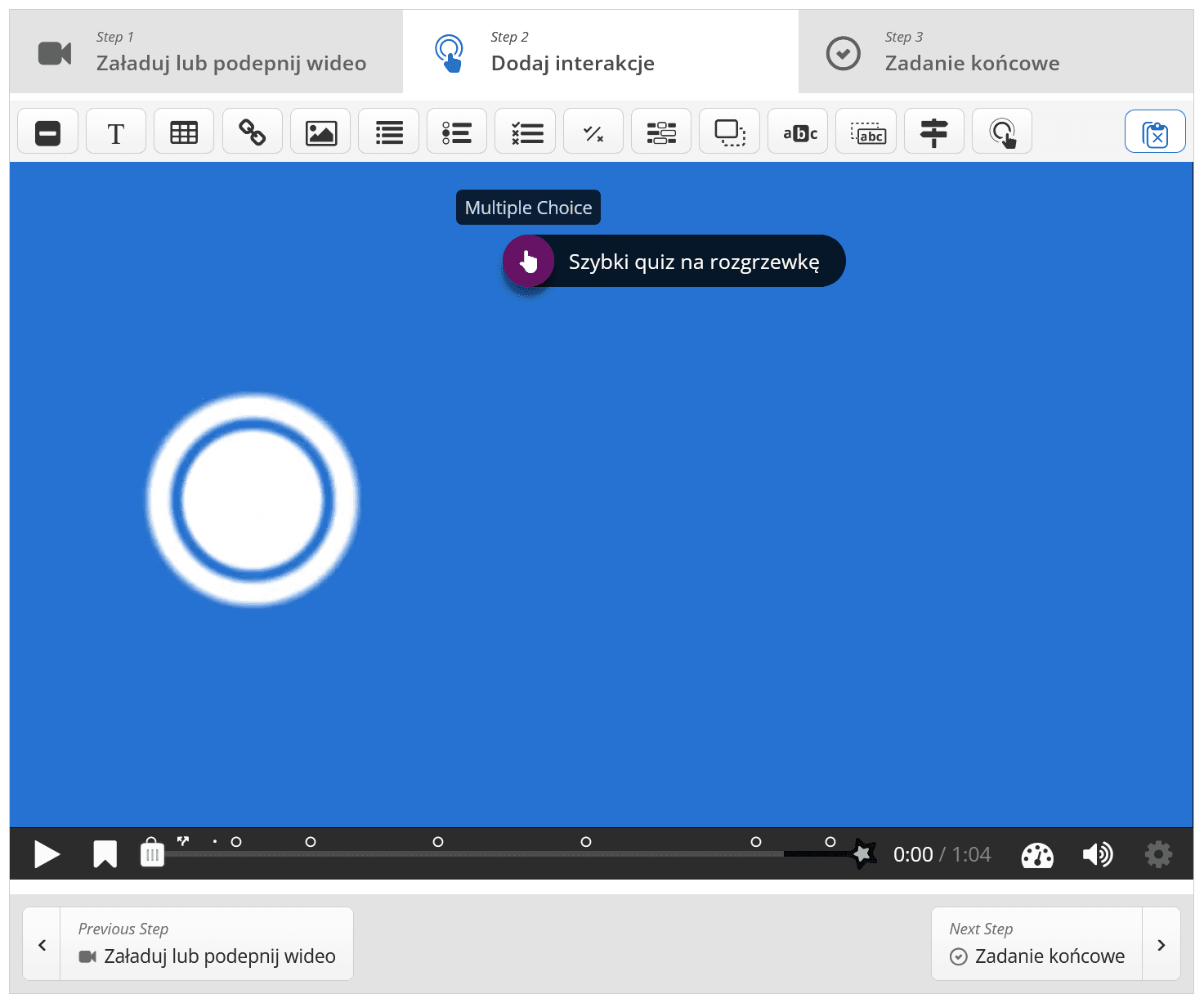
1. Interactive Video
This is one of the most powerful H5P tools. It allows you to enrich any video material (e.g., a webinar recording, product tutorial) with interactive elements such as single and multiple choice questions, fill-in-the-blank, drag-and-drop words, or additional text notes that appear at key moments.
- Company application: Product training, where employees must demonstrate their knowledge of features while watching a presentation. It can also be used in customer service training, pausing the video at a critical moment and asking the participant how they should respond.
2. Course Presentation
This format transforms traditional, linear presentations into an interactive experience. Quizzes, text, links, images and videos can be added to each slide. The participant is no longer just a passive recipient, but actively explores the content, answers questions and completes tasks.
- Application in the company: Onboarding new employees, where successive slides can present the company's departments, and questions woven into them will test their understanding of the organisational structure and key procedures.
3. Branching Scenario
This is an advanced tool for creating choice-based simulations. The participant is faced with a problem and must make a decision that leads them to the next stage of the scenario. Different choices lead to different consequences and endings, which perfectly simulates real-life professional situations.
- Application in the company: Soft skills training (e.g. negotiation, conflict resolution), sales training (simulation of a conversation with a customer) and safety procedures, where a wrong decision can have serious consequences in a virtual environment.
4. Drag and Drop
This format allows you to create tasks that involve dragging text or images and dropping them in the right places. It can be used to match concepts to definitions, categorise elements or arrange processes in the correct order.
- Application in the company: Verification of knowledge of procedures (e.g., arranging the steps of the complaint process), learning about product construction (matching names to parts on a diagram), or GDPR training (categorising data as personal or non-personal).
5. Fill in the Blanks
A classic task in which the participant must fill in the missing words in the text. The system automatically checks the correctness of the answers. This is a great way to reinforce key terminology and definitions.
- Company application: Training on legal regulations, internal rules or quality standards, where precise memorisation of key phrases is extremely important.
6. Question Set (Quiz / Question Set)
Allows you to create a comprehensive test consisting of different types of questions (multiple choice, true/false, fill in the blanks). After completion, the participant receives a summary of their results, which facilitates the assessment of progress.
- Application in the company: Knowledge tests at the end of a training module, certification exams or regular tests to reinforce knowledge. The LMS3 platform allows you to monitor the results of these quizzes at the organisation level, giving managers valuable insight into the competence level of their teams.
7. Flashcards
A simple but extremely effective tool for learning terminology, definitions or pairs of concepts (e.g. a product and its key feature). The participant enters their answer and then reveals the correct one, assessing their own knowledge.
- Application in the company: Learning specialised vocabulary (e.g. in the IT or medical industry), learning abbreviations used in the organisation, or quick revision before an important meeting.
8. Timeline
This format allows you to visually present a series of events in chronological order. Descriptions, photos and videos can be added to each point on the timeline, creating an engaging multimedia story.
- Company application: Presenting the company's history to new employees, visualising a new product implementation plan (roadmap), or discussing key milestones in an important project.
9. Interactive Image with Hotspots
Interactive points (hotspots) can be placed on any graphic (e.g., product photo, software screenshot, organisational chart). When you hover over or click on a hotspot, a window with additional text, image or video appears.
- Company application: Presentation of a new application interface, where hotspots explain the functions of individual buttons. It can also be used for health and safety training by marking potential hazards in a photo of a workplace.
10. Accordion
This format is used to present content in the form of vertical, expandable tabs. It is ideal for structuring large amounts of information in a clear way without overwhelming the user with a wall of text.
- Company application: FAQ section on a new employee benefit, presentation of detailed product specifications, or presentation of company policy in various areas.
11. Dialogue Cards
A tool similar to flashcards, but focused on language learning or conversation scenarios. One side of the card contains a phrase or question, and the other side contains a hint or translation. Participants can practise their pronunciation by typing in their answer.
- Company application: Language training for employees, practising standard phrases used in customer service, or preparing for conversations with foreign partners.
12. Summary
At the end of the training module, participants receive a series of statements and must select the ones that are correct. This tool forces them to actively recall and synthesise the most important information on a given topic.
- Application in the company: Quick summary and verification of understanding after completing a webinar, e-learning course chapter or reading a document.
13. Find the words
Participants solve an interactive puzzle by searching for words in a grid of letters. It requires concentration and reinforces terminology in an engaging way.
- Application in the company: Learning industry vocabulary, reviewing product names, exercises after a training module.
14. Image Comparison (Agamotto / Image Blender/ Image Juxtaposition)
This format allows for smooth transition between several images that are superimposed on each other. Using a slider, the user can compare, for example, the "before" and "after" states or different variants of the same product.
- Application in the company: Visualisation of the effects of implementing a new solution, presentation of changes in product design over the years, or comparison of the old and new software interface.
15. Virtual Tour 360
Allows you to create an immersive experience by combining a series of 360-degree photos. Participants can "look around" the virtual space, move between scenes and interact with hotspots placed within it.
- Company application: A virtual tour of the office or factory for new employees, a presentation of a property or facility to a client, or training in evacuation procedures.
LMS3: Your partner in building an interactive learning culture
Creating engaging H5P content is only half the battle. To fully leverage its potential, you need a robust LMS platform that allows for effective distribution, monitoring, and analysis.
LMS3, built on reliable TYPO3 technology, is more than just a place to store courses. It is a flexible educational ecosystem that allows you to:
- Full personalisation: Tailor the look and feel of the platform to your brand's visual identity, creating a consistent experience for your employees.
- Easy scalability: Expand your training offering without limitations. LMS3 offers a licence (we offer implementation in SaaS or on-premise models) whose price does not depend on the number of users or courses, ensuring cost predictability.
- Integration with other tools: In addition to H5P, LMS3 integrates with Moodle, webinar systems (BigBlueButton) and supports the SCORM standard, allowing you to import ready-made training courses and centralise all educational activities.
- Advanced reporting: Monitor participant progress, analyse test results and identify areas requiring additional support, making decisions based on hard data.
By implementing interactive H5P formats on the LMS3 platform, you not only increase engagement in training. You build a modern organisational culture where development is dynamic, measurable and tailored to the individual needs of each employee.
Would you like to see how H5P and LMS3 can transform training in your company? Contact us and our experts will prepare a personalised presentation of the platform's capabilities and help you choose the interactive formats that best suit your needs.
FAQ – Frequently Asked Questions
1. Do I need programming skills to create content in H5P? Absolutely not. H5P is designed for e-learning specialists, teachers and trainers. It has an intuitive visual editor where creating interactive tasks involves filling out simple forms and does not require writing a single line of code.
2. How can I measure the effectiveness of H5P-based training? H5P allows you to track results and progress. Integrated with an LMS such as LMS3, it automatically sends data on quiz results, time spent on tasks, and decisions made in scenarios. This gives managers full insight into the effectiveness of training and allows them to generate detailed reports.
3. Does H5P content work on mobile devices? Yes, all content created in H5P is fully responsive and automatically adapts to the screen size. Employees can learn at a time that suits them – on their way to work, during a coffee break or at home, using a computer, tablet or smartphone.
4. Can I use existing materials, such as videos or presentations? Of course. One of the biggest advantages of H5P is the ability to enrich existing resources. You can take a pre-recorded webinar and turn it into an interactive video, or turn a static PowerPoint presentation into engaging, non-linear training material.
5. How does H5P differ from SCORM? SCORM is a technical standard that ensures communication between an e-learning course and an LMS platform. H5P is a set of tools for creating interactive content. Importantly, many authoring tools allow you to export H5P content as a SCORM package, ensuring compatibility with most LMS systems. The LMS3 platform supports both H5P content and the SCORM standard, giving you maximum flexibility.
6. How many H5P formats does LMS3 support? Currently, over 30 – from simple quizzes to advanced interactive books and 360° virtual tours. This allows every company to create training courses tailored to their own needs.